Writing Signature: A Elegant Script Font for Web Design
I was working on a boutique online store layout one afternoon, trying to find the perfect font for the hero section. The client wanted something that felt handcrafted yet professional—something that would catch attention without overwhelming the design. That’s when I stumbled upon Writing Signature, a script font from Script Amp that immediately stood out with its elegant curves and subtle charm.
A Font with Personality
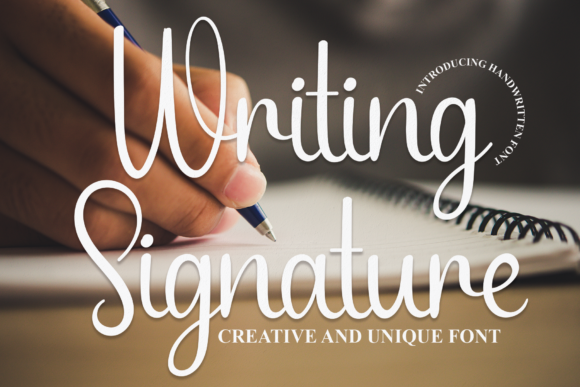
Writing Signature is more than just a font; it's a mood. Its flowing letters feel like they were written with a fine-tipped pen, giving it a personal and artistic touch. It has a gentle elegance that works well for creative brands looking to add a handwritten flair without sacrificing readability. As a web designer, I appreciate how it balances between decorative and legible, making it suitable for display use in various contexts.
The font carries a warm and inviting vibe, which makes it ideal for websites targeting niche markets such as handmade goods, wellness services, or lifestyle brands. It feels organic, almost like a signature you’d sign on a letter, which adds an authentic layer of trust and connection to the brand identity.
Putting Writing Signature to Work
I tested Writing Signature in several parts of the website design. First, I used it in the hero section, where it served as the main headline. The font looked great over a full-width image banner, especially when paired with a clean sans serif font for body copy. This combination created a visual hierarchy that guided the user’s eye naturally from the headline down to the supporting content.
Next, I tried using it in the call-to-action buttons. While it wasn’t ideal for small text due to its ornate style, I found that using it in larger buttons with enough spacing worked well. The font added a sense of personality to the CTA, making it feel more engaging and less robotic.
I also experimented with Writing Signature in blog headers and promotional banners. In these cases, the font brought a unique character that set the tone for the content. It helped differentiate sections and made the website feel more visually interesting and cohesive.
Readability and Responsiveness
One of the key concerns when using a script font is readability, especially on smaller screens. I tested Writing Signature across multiple devices and found that it performs well on desktops and tablets. However, on mobile devices, it needs to be used with caution. For example, using it in large headlines or short phrases works beautifully, but I avoided using it for long paragraphs or dense text blocks.
When placing Writing Signature over images, I noticed that it looked best with sufficient contrast. Light backgrounds or dark overlays helped the text stand out without being too overpowering. I also made sure to give each letter enough space, which prevented any potential issues with legibility on responsive layouts.
Another consideration was loading speed. Since Writing Signature is a premium font, I made sure to optimize the webfont delivery by using the correct file formats and ensuring it loaded efficiently without slowing down the page. This is especially important for e-commerce sites where fast loading times can impact conversion rates.
Font Pairing and Brand Consistency
Pairing Writing Signature with other fonts is crucial for maintaining brand consistency and visual balance. I found that it pairs exceptionally well with a clean sans serif font like Montserrat or Open Sans for body text. This combination keeps the design modern while still allowing the script font to shine in display areas.
For a more sophisticated look, I also tested pairing it with a simple serif font like Georgia or Merriweather. This gave the website a slightly more traditional feel, which worked well for a boutique brand selling artisanal products.
It’s important to note that Writing Signature should not be used for all text elements. It’s best suited for headings, logos, and decorative accents rather than long-form content. When used appropriately, it enhances the visual appeal of the site without compromising usability.
What to Consider Before Using Writing Signature
Before implementing Writing Signature on a live site, there are a few things to check. First, ensure that the font supports the necessary languages and characters if your audience includes non-English speakers. Also, verify that the font comes with commercial licensing if you're using it for client projects, online stores, or digital templates.
Check the available styles, weights, and alternates to see if they meet your design needs. Some script fonts come with ligatures and swashes that can add extra flair to your designs. These features can be particularly useful for creating custom logos or branded assets.
Lastly, make sure the font file format is compatible with your website platform. Whether you’re using Google Fonts, self-hosted fonts, or embedding via CSS, having the right format ensures smooth performance and compatibility across browsers.